What is a Deadbolt?
Add extra security for your home.
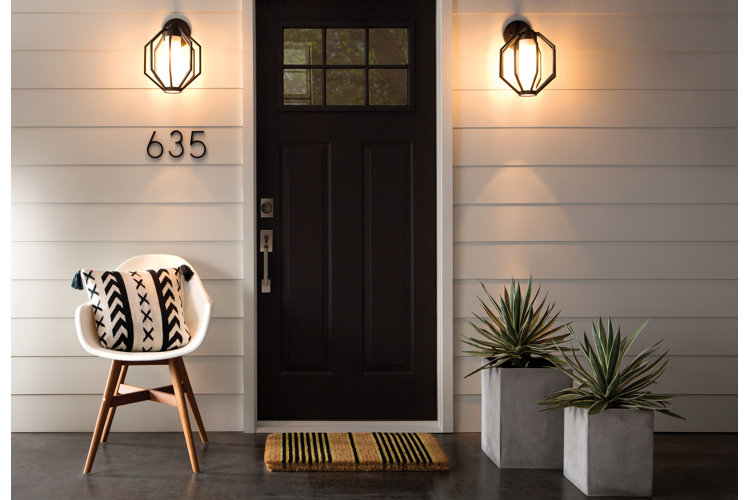
Looking to upgrade your home security? A deadbolt is a simple way to ensure that your home is more secure, giving you the peace of mind that you’re looking for. With mechanical and electrical options available, it's easy to find a deadbolt that suits your needs. Read our guide to learn about the different types of deadbolts and a few helpful features that will make your home feel more protected.
In this guide:
What is a Deadbolt?
Types of Deadbolts
Deadbolt Features
Deadbolt Finishes
What is a Deadbolt?
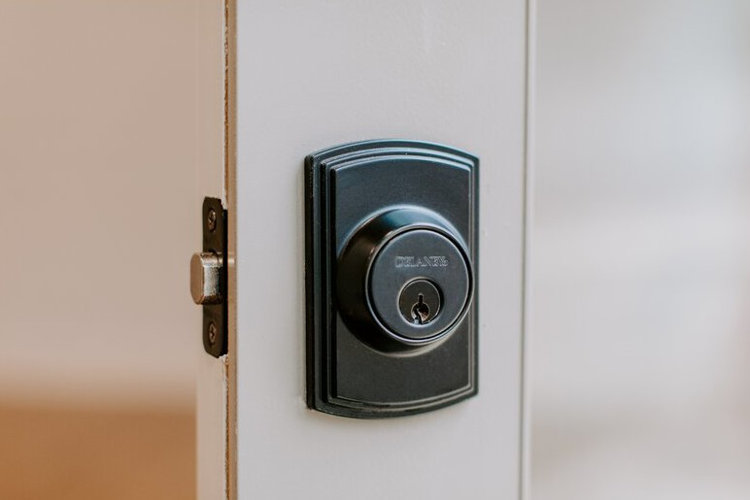
A deadbolt is a type of lock that is operated with a key or a turning mechanism. They're often positioned above the door handle and its typical spring-activated lock for additional security. Unlike a spring-activated lock that can be lock-picked or broken into, deadbolts feature a bolt that locks into a hollow plate installed on the inside of a door frame. The bolt is made of solid metal and extends further than a typical lock to provide extra protection. This makes deadbolts more difficult to break past than spring-activated locks.
Types of Deadbolts
When choosing the right deadbolt for your home, consider what kind of lock will best suit your needs. The two main types of deadbolts are mechanical and electronic. Mechanical deadbolts lock into place manually using a key or lever to turn the bolt into the place. Electronic deadbolts use a keypad, touchscreen, smartphone, or remote paired with a battery-operated locking mechanism to lock and unlock the door the same way as a mechanical deadbolt.
Mechanical Deadbolt Options
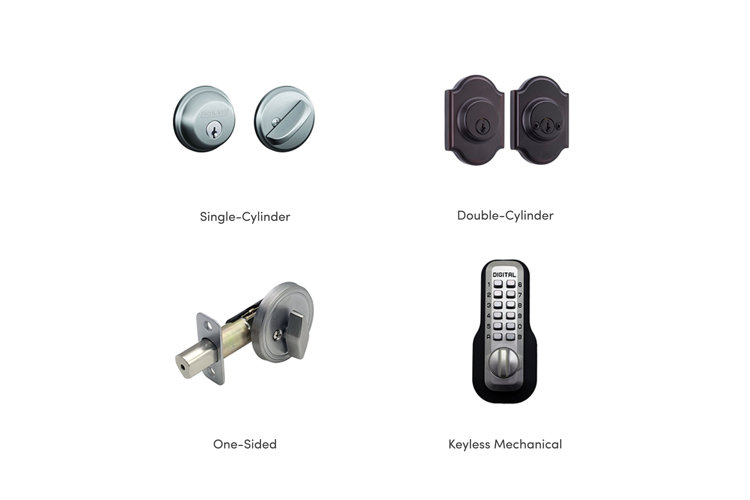
Mechanical deadbolts are the most common and affordable options. They are operated using a bolt and a lever system for a simple and approachable design. We've outlined four of the most common types of deadbolts to help you find the best mechanical option for your home.
Single-Cylinder: A single-cylinder deadbolt has a key slot on one side and a simple turning mechanism on the other side. The turning mechanism is placed on the interior side of the door so that you can lock it without using a key from the inside.
Double-Cylinder: A double-cylinder deadbolt functions similarly to a single-cylinder deadbolt. Instead of one side with a key slot and another side with a turning mechanism, a double-cylinder deadbolt features a key slot on each side. This type of deadbolt provides more security, but can take more time to operate. We recommend keeping a key nearby in case of emergency.
One-Sided: Where single- and double-cylinder deadbolts have two sides that can operate the lock, one-sided deadbolts can only be locked from one side of the door. These deadbolts feature a turning mechanism similar to single-cylinder deadbolts for easy use and added security.
Keyless Mechanical: Keyless mechanical deadbolts feature a keypad that allows you to access the lock without needing a key. Instead, a unique numerical passcode provides a quick, keyless entry. Keyless mechanical deadbolts often have helpful features, such as lit keypads or one-time user codes for guests.
In addition to mechanical deadbolts, there are a wide range of electronic deadbolts. Electronic deadbolts often use protocols like Wi-Fi and Bluetooth to operate remotely and have smart features integrated into the design. Not all electronic deadbolts require a smart protocol – some operate solely on batteries. In case of electric failure, electronic deadbolts can still be locked and unlocked manually with keys.
Modes of Entry
For electronic deadbolts, there are different modes of entry, including keypad, touchscreen, smartphone activation, and remote control.
Keypad: Keypads feature simple numerical buttons. This type of deadbolt is affordable and easy to use. For added convenience, look for a keypad with buttons that light up in the dark.
Touchscreen: Similar to keypads, touchscreens have a flat screen with numerical buttons. The sleek design is a great choice if you're looking for functionality and style.
Smartphone-Activated: This type of deadbolts can be locked and unlocked from your smartphone. App-enabled deadbolts let you manage the passcode, set up auto-lock features, and lock or unlock the door from a distance. This tech-savvy option is perfect for homes that have other app-enabled devices, such as smart doorbells, thermostats, or appliances.
Remote Control: This type of deadbolt includes a small remote control that can be used to lock and unlock the deadbolt without using a key. This is a great option for a more hands-off experience and the ability to lock and unlock on-the-go.
Smart Protocol
An electronic deadbolt with smart features, like the smartphone-activated deadbolt, needs to be able to connect through a communication protocol. Most are operated using Wi-Fi connection, Bluetooth, or Z-Wave technology. Keep reading below to see which smart protocol works best for your home.
Wi-Fi: Wi-Fi-connected deadbolts allow you to lock and unlock the deadbolt remotely, create new access codes, and view the lock’s status from anywhere. Using a Wi-Fi-enabled deadbolt also lets you connect the deadbolt to other smart devices on your Wi-Fi network, such as a smart home hub. Because the deadbolt uses a Wi-Fi network, its range extends as far as the network itself, and the deadbolt can be operated from any device that is also connected to Wi-Fi.
Bluetooth: Bluetooth is a common smart protocol for deadbolts because of its energy-efficient use of battery. The range of Bluetooth-connected deadbolts is roughly 300 ft. Since most smart devices are synced through Bluetooth, you can also connect this type of deadbolt to other smart devices.
Z-Wave: Z-wave is another popular protocol for smart deadbolts. It is a type of wireless communication protocol often used in home automation, which uses low-energy radio waves to operate connected devices. Unlike Wi-Fi or Bluetooth, Z-Wave deadbolts don't automatically connect with a smartphone and require a Z-Wave-compatible hub to operate. Once connected to a hub, you can seamlessly use the deadbolt from any location within the Z-Wave range. Z-Wave can connect with even more smart devices than Bluetooth. If you plan on using multiple smart devices like smart lighting or thermostats in addition to the deadbolt, Z-Wave is an excellent option.
After learning about the different types of deadbolts, there are a few additional features to also consider. From auto-lock capabilities to easy re-keying, opt for upgrades that customize your home security.
Auto-Lock Capable: Auto-lock is a feature that enables you to set a timer to lock the deadbolt a certain amount of time after it’s been unlocked. You can also set a schedule for the auto-lock feature to turn on at certain times of the day or days of the week.
Lit Keypad or Touchscreen: For nighttime arrivals, having a keypad or touchscreen that lights up allows you to see the numbers clearly and makes entering a passcode even easier.
Motorized: Motorized deadbolts are often keyless alternatives to mechanical deadbolts. This type of deadbolt uses a motorized mechanism to move the bolt and set it into place. Motorized deadbolts are often operated with a button or touchscreen, rather than the lever used for mechanical deadbolts.
Smartkey: This type of deadbolt is designed with Smartkey technology that allows you to re-key the lock in seconds. Simply insert the current key into the lock and turn it 90° clockwise. Insert the Smartkey tool firmly above the current key and then remove both the current key and tool. Insert the new key and rotate it 180° counterclockwise before rotating the new key 90° clockwise back to the starting position to successfully re-key the lock.
Usage-Monitoring: Keep track of who is coming and going with usage-monitoring. With this feature, you can check activity and manage users from your smartphone. Usage-monitoring is a helpful addition for rentals or busy households.
Deadbolt Finishes
Deadbolts come in a wide range of common finishes, such as black, bronze, brass, and nickel, to match the other finishes in your home.
Tip!
For more info on door locks and door knobs, check out our guide The Best Types of Door Locks & Door Knobs for Your Home.
