How to Mount a TV
Streamlined screening.
Mounting your flat-screen TV on the wall is an easy way to elevate your entertainment experience. Check out our guide for everything you need to know about how to mount a TV, from how high to mount it to how much mounting your TV will cost you.
Project Overview
- Time: 1–2 hours
- Skill Level: Intermediate
- Number of People Recommended: 2
What You’ll Need:
- Mount
- Pencil
- Power drill
- Screws (usually included with mount)
- Hammer
- Nails
- Level
- Electronic stud finder
- Painter's tape or sticky notes
- Flatscreen TV
How to Mount a TV: Step-by-Step Installation
Before installing your mount, it is important to read through the instructions for your TV and mount to confirm you have all the appropriate tools. Then, following the steps below for a seamless installation process.
1. Determine Your TV Location
Have someone hold your TV (or a TV-sized piece of cardboard) against the wall in different places and at different heights while you move around the room. You’ll want to test how the screen looks when standing and sitting in different positions – making sure to check for potential glare from windows or light fixtures. Use a measuring tape to find the distance between your TV and your viewers. The distance should be slightly smaller than two times the diagonal size of your TV. Wherever you choose to place your TV, make sure there is a power outlet within reach.
Knowing exactly how high to mount a TV depends on the layout of your seating and positions of the viewers. Typically, the distance from the floor to the center of the TV should be 56" for a 42" TV, 61" for a 55" TV, 65" for a 65" TV, and 67" for a 70" TV – but this can vary depending on the position of your seats and height of your ceiling. A comfortable viewing angle is anywhere between 10 and 30 degrees above eye level.
Tip!
Read our guide How High to Mount a TV for more tips on determining the ideal position for your TV for a comfortable viewing experience.
2. Choose a Mount Type
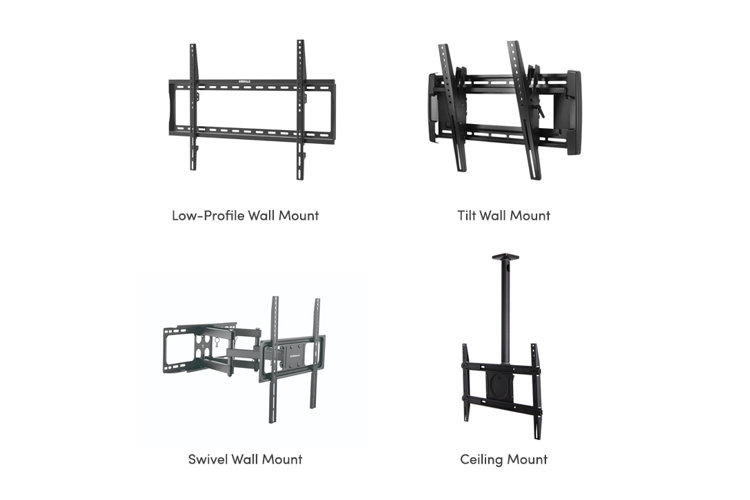
The TV installation process will be different depending on your space and mount type, so it is important to understand what kind of mount you have. If you haven't bought a TV mount yet, learn about the various options below.
Low-Profile Wall Mount: Also known as a flat- or flush-mount bracket, this mount type is a simple metal frame that secures your TV to the wall like a picture frame. A low-profile mounted TV sits between 1" and 2" from the wall. This style is fixed, meaning it doesn't pan, tilt, or rotate. It is one of the easiest wall mounts to install and consists of a wall-attaching bracket and two upright posts, or one flat plate that attaches to the back of your TV. Though this can make managing rear cables difficult, these mounts are perfect if you don’t want your TV to take up too much space.
Tilt Wall Mount: These are most popularly used to install a TV above a fireplace. These mounts look and install very similarly to low-profile mounts, except that the two upright posts can be adjusted to angle a TV up or down by 15 degrees. Tilt mounts typically cost more than fixed mounts. The tilt provides more room for installing cables in the back of the TV and will help fight glare in a bright room.
Swivel Wall Mount: A swivel wall mount is great for mounting a TV in a corner or for rooms that require specific seating arrangements. Also called full-motion and articulating mounts, swivel mounts can tilt from side to side as well as up and down. In most cases, a swivel wall mount has a bracket or flat, butterfly-shaped panel that attaches to the back of your TV. Typical swivel mounts angle up and down the same way as tilt mounts, but also pivot on a jointed arm that can be extended and collapsed, depending on how far you’d like your TV to reach off of the wall. These mounts tend to be more expensive and harder to install than fixed and tilt mounts.
Ceiling Mount: Ceiling mounts attach your TV to your ceiling. These mounts consist of a ceiling attachment, a long, usually fixed arm that holds the TV from the ceiling, and a bracket that attaches to the back of the TV. These mounts are the most expensive available, and tend to be more difficult to install than wall mounts because of the height you’ll need to access the ceiling. They can also be more dangerous if installed incorrectly, so it’s essential to be careful working with ceiling-mounted TVs.
Tip!
When choosing a TV mount, keep in mind the size, weight, and model of your TV. Some mounts are better optimized for certain sizes of TVs than others. Often, mounts will be made to match a specific model of flat-screen TV.
3. Locate & Mark Wall Studs
Once you’ve chosen a spot on your wall or ceiling, use your electric stud finder to locate a stud or pair of studs behind your wall. Find the center of the stubs and mark their locations. Check that you’ve found a stud by gently hammering a nail into the wall to test the resistance. To mount a TV to drywall, brick, or metal without studs, you’ll need wall mounting toggles or anchors, which hold weight in a way that doesn’t put stress on your wall. Be careful: If you don’t mount your TV properly, you can damage your wall and your TV.
4. Mark & Drill Pilot Holes
Hold your mount to the wall above the studs and use a level to ensure that it is straight up and down. A level won’t be necessary if you’re installing a ceiling mount. Mark the places on the wall or ceiling where you will screw in your mount and mark them with a pencil. Then, drill your pilot holes on the marks.
5. Attach Your Mount
Put your mount back in position, ensuring once again that it is level and lined up with the pilot holes you made. Using your drill, screw the mount to your wall and secure it with the provided hardware.
6. Connect the Bracket & TV
On your TV, locate where the attaching screws are meant to go and connect your mount using those holes. With tilt, swivel, or ceiling mounts you may have to do this up against the wall.
If not already attached, connect your TV’s mounting bracket or panel to the wall mount. Make sure to read your mount’s instructions to do this properly. To remove your TV from the mount, just carefully unscrew it from the mounting panel or wall.
